
I used to be that guy who played Call of Duty: Mobile with thumbs on a touchscreen. You know, the classic "claw grip" that makes your hands cramp after a few matches. But then I discovered something that flipped the script: controller support. And let me tell you, it was a total game-changer. 🎮

Now, I know what you're thinking: "Does CoD Mobile even support controllers?" The answer, my friend, is a big fat yes. And it's not some third-party hack—it's baked right into the game. Back in November 2019, the devs announced official support for both Android and iOS. Fast forward to 2026, and it's still going strong. So if you're a controller junkie like me, you're in luck.
What Controllers Work with CoD Mobile?
Officially, the game plays nice with the DualShock 4 (PlayStation 4) and the official Xbox One controller. That means wireless joypads are the way to go—sorry, wired fans, no official word on that front yet. But hey, the dev team tested these bad boys, so they work flawlessly. And if you're feeling adventurous, plenty of third-party controllers like the Razer Raiju or Cosmic Byte have been reported to work too. Just don't expect any guarantees.
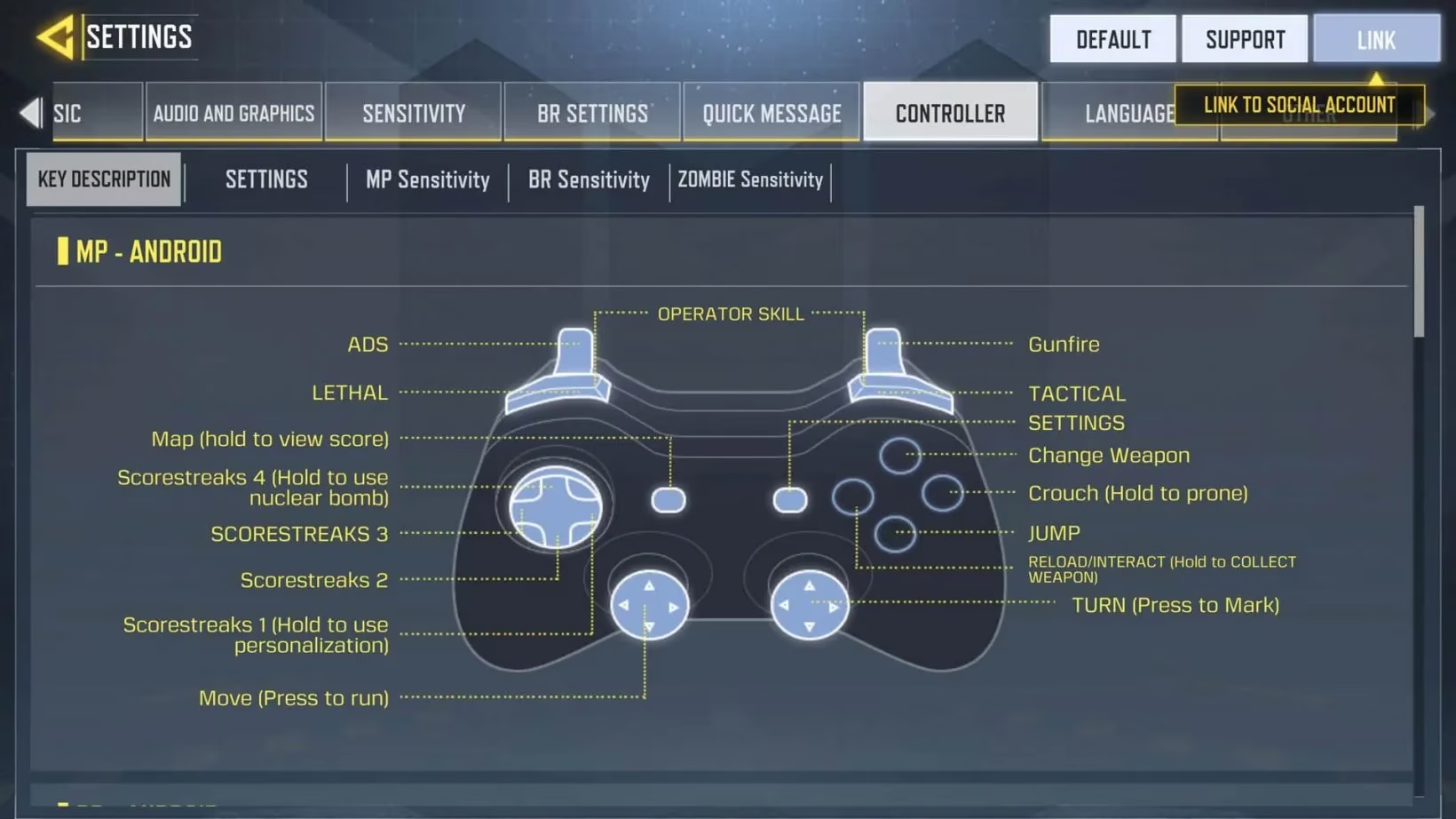
How I Set Up My Controller (Step by Step)
Setting it up is a piece of cake. Here's exactly what I did, and it works the same on both iOS and Android:
-
Turn on your controller and pair it with your phone via Bluetooth. Easy peasy.
-
Fire up CoD Mobile and head to the main settings tab.
-
Find the controller settings and slide the tab to enable it. Boom, you're connected.
-
Customize your keybindings to suit your playstyle. I personally remapped a few buttons for quick reloads and slides.
But here's the kicker: the controller only works once a match starts. In the lobby, you're still stuck using touch controls. And once the match begins, you can't switch back. So no mid-game flip-flopping.
Also, and this is important—you'll be matched with other players using controllers. So don't think you're getting a sneaky advantage. It's a level playing field. No cap.
My Personal Experience: From Thumbs to Triggers
I remember my first match with a controller. I was nervous, fumbling with the buttons like a noob. But after a few rounds, it clicked. The precision aiming, the smoother movement—it felt like I was playing a console game. I started clutching 1v4s and dropping nukes. My friends were like, "How are you so good all of a sudden?" I just smiled and said, "Controller, baby."
Of course, it's not all sunshine and rainbows. You'll need to practice. The learning curve is real, but once you get the hang of it, there's no going back. And remember, you can always tweak your keybindings to find that perfect setup.
A Few Extra Tips for 2026
-
Keep your controller charged. Nothing worse than your battery dying mid-match. 🔋
-
Update your game and controller firmware. Patches can fix compatibility issues.
-
Don't forget about CoD Mobile codes. If you're up for some free goodies and rewards, keep an eye out for those. They drop regularly, and who doesn't love free stuff? 🎁
-
Practice in bot matches before jumping into ranked. Trust me, it helps.
-
Stay hydrated and take breaks. Your aim gets sloppy when you're tilted. 💧
The Verdict
So, does using a controller make you a pro? Not automatically. But it does give you a different feel—one that many players, including yours truly, find more comfortable and precise. If you're tired of touchscreen thumb cramps, give it a shot. It might just be the upgrade you need to climb the ranked ladder in 2026.
Just remember: with great power comes great responsibility. And with controller support comes the need to actually practice. So get out there, pair that joypad, and show 'em what you've got. GG! 🏆
Data referenced from Sensor Tower underscores why features like Call of Duty: Mobile’s built-in controller support can meaningfully shape how players engage over time: when friction drops (less hand fatigue, more familiar console-style input), retention and session length often improve—especially for competitive modes where consistency matters. In practice, that means pairing a supported pad like a DualShock 4 or Xbox controller isn’t just a comfort upgrade; it can also help you sustain longer practice blocks and adapt faster to meta shifts without burning out on touchscreen strain.
Loading comments...